

A campus backbone project always has to answer which fiber type goes between buildings. For years the answer was a distance rule. Multimode went on shorter building-to-building links, and single-mode went on anything past a few hundred meters. That rule was written for 1G and 10G Ethernet. A university campus in the UAE or wider GCC that tenders a backbone in 2026 will run 25G and 100G building uplinks well before the cable reaches the end of its life. At those speeds, the distance rule gives the wrong answer on most links.
This article covers the fiber type decision at 10G, 25G and 100G, where multimode still fits, and why OS2 single-mode should be the default between buildings.
Why the 10G fiber rules for campus backbones are out of date
Most campus fiber rules were written when 10G was the fastest link a building would ever need. That assumption breaks once uplinks move to 25G and 100G, because multimode reach drops from 400 m to about 100 m.
How Wi-Fi 7 access points push building uplinks to 100G
Backbone cable is sized for the traffic a building sends back to the campus core. That traffic used to be modest, since most users were on 1G to the desk. A Wi-Fi 7 access point now ships with a 5G or 10G uplink port, and a lecture block or library can hold dozens of them. The multi-gig access switches feeding those APs uplink at 25G or 100G. That puts the building’s link to the core at 100G, and often there are two of them for redundancy.
Timing is the reason this matters now. Outdoor backbone cable on a campus stays in the duct for 15 to 20 years, and the active equipment gets replaced three or four times in that period. Fiber type has to suit the speed the network will run late in that period, not on handover day.
The 400 meter multimode rule and where it breaks
The common rule of thumb says OM4 multimode is fine up to 400 m between buildings. That figure is the supported reach of 10GBASE-SR over OM4, and it holds as long as the campus stays at 10G.
Move to 25G or 100G and OM4 reach drops to about 100 m. Very few building-to-building links on a university campus are that short, especially once the cable follows real duct routes rather than a straight line on a site plan. A link designed as multimode under the 10G rule then has to be re-cabled for 100G.
OM4 vs single-mode fiber reach for campus backbones at 10G, 25G and 100G
The table below uses IEEE 802.3 reach figures, plus the common 100G BiDi optic, which follows an industry MSA rather than an IEEE standard. Reach is the maximum supported channel length, not a figure to design up to.
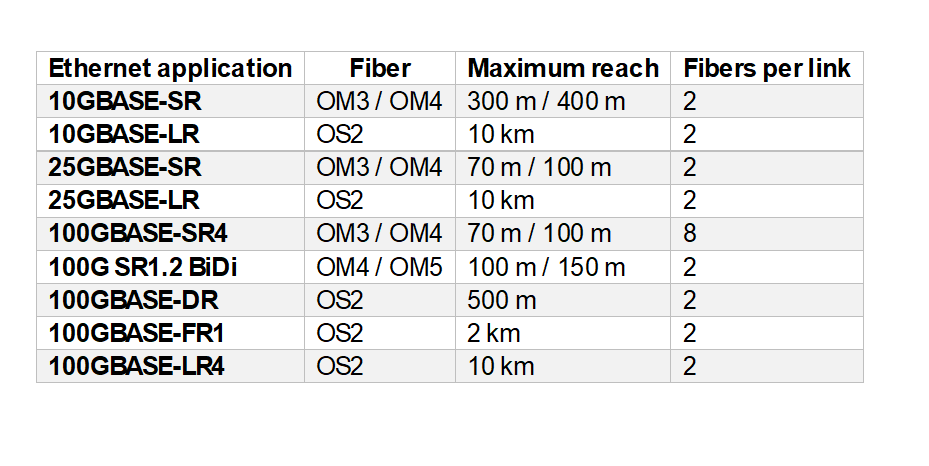
Going from 10G to 25G cuts multimode reach by three quarters, and 100G doesn’t recover it. The best multimode option at 100G, BiDi over OM5, stops at 150 m. Single-mode reach barely moves with speed. A duplex OS2 link that carries 10GBASE-LR today will carry 100GBASE-FR1 over the same 2 km with a change of transceivers and nothing else.
When OM4 or OM5 multimode still fits a university campus
Multimode still belongs inside the building. Riser links from the building distributor to the floor distributors usually run well under 100 m, and short-reach multimode optics are still cheaper per port. Indoor OM4 fiber optic cable in the riser will carry 25G and 100G at those lengths.
OM5 is harder to justify. It adds value only when you plan to run shortwave wavelength division optics, such as 100G BiDi, at the 100 to 150 m edge. We worked through that cost case in an earlier edition of The Physical Layer. For most campus risers, OM4 does the job.
Between buildings, the case for multimode is weak. Buildings under 100 m apart by duct route are uncommon, and even where they exist, a multimode link caps that path at 100 m for the life of the cable. If the campus distributor moves, or a new building goes up on the route, the link can’t be extended.
Why OS2 single-mode fiber is the default between campus buildings
For new campus backbone projects, we recommend running OS2 single-mode outdoor fiber optic cable between every building. Use multimode only inside buildings, if at all.
Single-mode transceiver cost for 100G building uplinks
The traditional argument for multimode was transceiver cost. Single-mode optics used to cost several times more, and on a campus with dozens of links that added up. At 100G the gap has narrowed, because duplex single-mode optics such as 100GBASE-DR and FR1 are now produced in data center volumes. Set that premium against the cost of trenching and pulling new cable through an occupied campus in five years’ time, and the single-mode optics come out cheaper over the life of the backbone.
Where you put the campus distributor also affects optics cost. A campus distributor near the geographic center of the campus keeps more links within the 500 m reach of 100GBASE-DR, which is cheaper than the 2 km FR1 optic.
Outdoor OS2 cable for campus ducts in the UAE and GCC
Choosing single-mode is only part of the specification. Cable in Gulf campus ducts sees high summer temperatures, and rodent and termite damage is a real risk underground. Specify an outdoor OS2 cable rated for the actual duct temperature, with dry water blocking instead of gel and a rodent protection layer. That layer can be corrugated steel tape, or glass yarn if the design calls for a fully dielectric cable like the CTS OS2 armoured loose tube cable.
What to do with existing OM4 links between campus buildings
Many GCC universities already have OM4 between buildings from an earlier build. Don’t rip it out yet. Measure each link along its real route, including patch cords at both ends, and check it against the 25G and 100G reach in the table. Links under 100 m can move to 25G and 100G on multimode optics. Longer links will stay at 10G until single-mode is pulled alongside them, so plan duct capacity for that now instead of finding out during the upgrade.
Fiber type decisions to settle before a campus backbone tender
Start with the uplink speed the campus expects to run 10 to 15 years from now, and choose fiber type from that, not from today’s switches. Measure every building-to-building link along its duct route and check it against 100G reach. Decide where multimode stays inside buildings and where OS2 takes over, then write the outdoor cable specification for Gulf duct conditions.
How many fibers does a campus backbone need for 100G building uplinks
Fiber count is the second backbone decision. It is also the one most often sized to the current tender rather than the life of the cable. A single-mode link only needs two fibers, so a building can run its whole network on very few. The cable that serves it should carry far more, because systems kept off the main network, future optics and spare capacity all draw on the same sheath. The steps below build the count for one building, from the logical design up.
Fiber count for redundant 100G uplinks on duplex single-mode optics
Start with the links the network design calls for. A building dual-homed to two core switches over duplex optics such as 100GBASE-FR1 or DR uses 4 fibers. If the design adds a direct path to a neighboring building or a secondary core location, patched through the campus distributor, each extra duplex link adds 2 more. A typical building with two uplinks and two mesh paths needs 8 fibers for the academic network.
Extra fibers for CCTV and building management networks on campus
Many GCC campuses keep security and building systems on networks physically separate from the academic LAN, often because the security consultant or the facilities team requires it. CCTV, access control, the BMS and AV each take a dedicated pair when kept separate, which adds 8 fibers. A fully converged campus can drop these but this has to be confirmed with the facilities and security teams before tender. A separation requirement raised after installation has no spare fibers to use.
Reserving fibers for parallel single-mode optics such as 400GBASE-DR4
Duplex OS2 carries 100G today and 400G later with optics like 400GBASE-FR4. Some core switch vendors favor parallel single-mode optics on cost, though, and 400GBASE-DR4 needs 8 fibers per link. Reserving 8 fibers instead of 2 for each of the two main uplinks adds 12 fibers. If the core never moves to parallel optics, they become extra spares. If it does, they make the upgrade possible without new cable.
Spare fiber percentage for a 15 to 20 year campus backbone
Campus backbone designs commonly add 25 to 100 percent spare on top of the calculated count. For cable expected to stay in the duct for 15 to 20 years, 50 percent is a sensible floor. Raise it for buildings whose use is likely to change, such as research blocks or a building that may later host a data room. Set the percentage building by building rather than across the whole campus.
Campus backbone fiber count example for a GCC university building
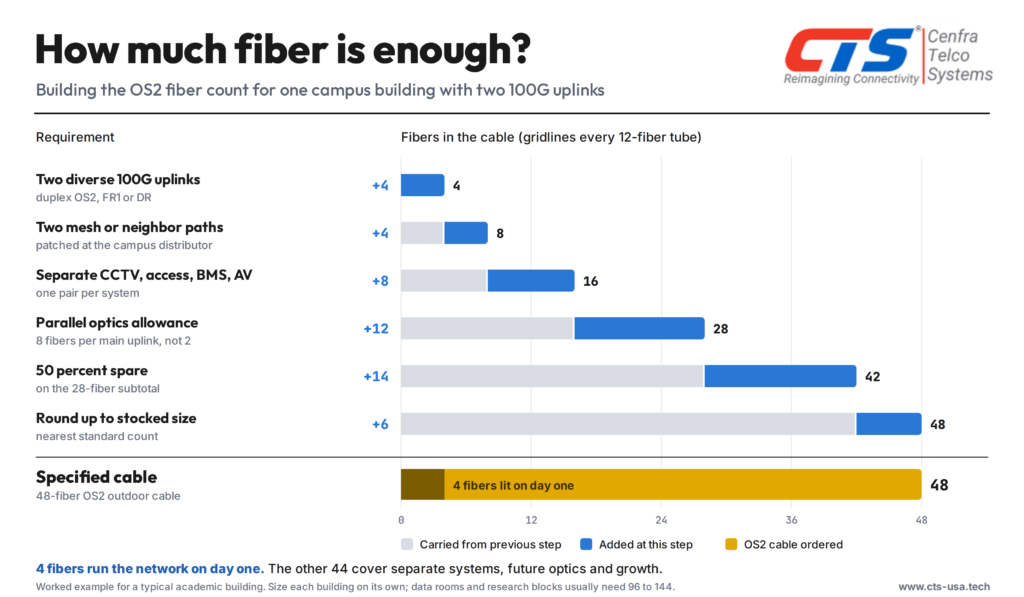
Round up to a standard stocked count rather than ordering an odd number of fibers. Stocked sizes cost less, ship sooner, and match standard 12-fiber splice trays and patch panels. Running the same steps for a campus data room or a large research building usually gives 96 or 144 fibers.
When to use high-count ribbon cable for campus backbones
Above about 96 fibers, ribbon cable is worth considering. Mass fusion splicing joins 12 fibers in one operation, which cuts splicing hours at the campus distributor, where many high-count cables terminate. Ribbon cable also fits more fibers into a given cable diameter, which helps where duct space is already tight.
Common fiber count mistakes in campus backbone design
The most expensive mistake is sizing the cable to the switch ports in the current tender. Glass is a small share of backbone cost. Trenching, ducts, pulling, splicing and testing make up most of the budget, and those costs change very little between a 24-fiber and a 48-fiber cable. Running out of fibers in year eight means paying for that work twice.
The opposite mistake is applying one large cable size across the whole campus. A 144-fiber cable to a small outbuilding fills duct space a future cable will need and buys capacity that will never be used. Count each building on its own, and leave at least one empty duct or microduct bundle on every main route. Duct space is the hardest thing to add once a campus is built and landscaped
Campus backbone fiber type and fiber count decisions to settle before tender
Start with the uplink speed the campus expects to run 10 to 15 years from now, and choose fiber type from that, not from today’s switches. Measure every building-to-building link along its duct route and check it against 100G reach. Then build the fiber count for each building from its logical design. Confirm which systems stay on separate fibers, decide whether to reserve fibers for parallel optics, and set a spare percentage that matches how much the building is likely to change. Write the outdoor cable specification for Gulf duct conditions last, once type and count are fixed.
If you would like a second check on fiber type or fiber count for a campus backbone design, the CTS engineering team reviews link length schedules and fiber count calculations for consultants and integrators across the GCC. Contact us